Amy M. Burns

Elementary Music Technology and Integration

Amy M. Burns has taught PreK-grade 4 general music for over 25 years at Far Hills Country Day School (FH) (https://www.fhcds.org/). She also teaches grade 5 instrumental class, directs the FH Modern Band, is the Performing Arts Department Manager, and teaches privately in the after-school conservatory, having served as director for over 20 years. She has authored four books and numerous articles on integrating technology into the elementary music classroom. She has presented many sessions on the topic, including four keynote addresses in TX, IN, St. Maarten, and AU. She is the recipient of the 2005 Technology in Music Education (TI:ME) Teacher of the Year, the 2016 New Jersey Music Educators Association (NJMEA) Master Music Teacher, the 2016 Governor’s Leader in Arts Education, the 2017 NJ Nonpublic School Teacher of the Year, and the 2026 NJMEA Distinguished Service Awards. Her most recent publication, Using Technology with Elementary Music Approaches (2020), is available from Oxford University Press (OUP) and Amazon. Burns is also the Community Coordinator for Midnight Music (MMC) at https://midnightmusic.com/, the General Music Chair for NJMEA Board of Directors, and the Elementary Music Consultant for MusicFirst (https://www.musicfirst.com/), a company built by music educators for music educators, dedicated to helping music teachers and their students make the most of technology in the classroom.

Looking for my YouTube Channel or the manipulatives for my Play-Along Videos? Click the social feed buttons below!

March Rhythm Play-Along and Body Percussion Play-Along Videos Featuring All-Female Groups

Here in the States, March is Women’s History Month as well as Music In Our Schools Month. For this month, I chose to create a rhythm play-along video that features a medley of four all-female groups that span four decades of music. The rhythm patterns include whole, half, quarter, and eighth notes, and quarter rests.

Update: I added the Body Percussion Play-Along this week that accompanies the rhythm play-along video!

The groups and songs that are featured are:

Caffey, C. (1981). We Got The Beat. [Recorded by The Go-Go's]. On Beauty and the Beat [Audio File]. Retrieved from https://www.youtube.com/watch?v=_Wvue2OT-FA

Holland-Dozer-Holland. (1964). Baby Love. [Recorded by The Supremes]. On Where Did Our Love Go? [Audio File]. Retrieved from https://www.youtube.com/watch?v=BO_zEzrJRuE

Dent, A., Knowles, B., & Knowles, M. (2001). Survivor. [Recorded by Destiny's Child]. On Survivor [Audio File]. Retrieved from https://www.youtube.com/watch?v=Wmc8bQoL-J0

Edwards, B., & Rodgers, N. (1979). We Are Family. [Recorded by Sister Sledge]. On We Are Family [Audio File]. Retrieved from https://www.youtube.com/watch?v=oMVe_HcyP9Y

Credit: unsplash-image-5gn2soeAc40.jpg

The Go-Go’s We Got The Beat

The Go-Go’s are an American All-Female Rock Band started in 1978 in California. It has featured numerous band members and became very popular in the 1980s with the song, “We Got The Beat,” off the album Beauty and the Beat. The musicians featured on this recording are Charlotte Caffey on lead guitar and keyboards, Belinda Carlisle on lead vocals, Gina Schock on drums, Kathy Valentine on bass guitar, and Jane Wiedlin on rhythm guitar. This debut album topped the charts, which was a first for an all-female band that wrote and performed all of their music. “We Got The Beat” is considered The Go-Go’s signature song.

Credit: unsplash-image-OKLqGsCT8qs.jpg

The Supreme’s Baby Love

The Supremes broke onto the music scene as a premier act of Motown Records in the 1960s. They paved the way for future African American R&B and soul music groups. Their popularity rivaled The Beatles during the 1960s. After a few changes in the group’s members as well as a name change (they started as The Primettes), the group’s members were Diana Ross, Florence Ballard, and Mary Wilson. “Baby Love”, from their second studio album titled, Where Did Our Love Go?, was one of 12 singles from them that went to #1 on the American charts.

Credit: unsplash-image-9wQIAuHkfaY.jpg

Destiny’s Child’s Survivor

The song, “Survivor”, comes from Destiny’s Child third studio album of the same name. The Grammy Award-winning song and MTV Award-winning video topped the charts at #2. The group’s members that recorded the song are Beyoncé, Kelly Rowland, and Michelle Williams. The group had gone through numerous changes in membership. So much so that a radio station compared them to the show, Survivor. After hearing this comparison, Beyoncé decided to turn that joke into a song, which became a big hit.

Credit: unsplash-image-sitjgGsVIAs.jpg

Sister Sledge’s We Are Family

Sister Sledge defined the disco sound and their single, “We Are Family” topped the charts at #3 from their debut album of the same title. It is hard to believe that this iconic song did not hit #1 nor won the Grammy Award that year because it is still a popular song today. The group consists of the sisters, Debbie, Joni, Kim, and Kathy Sledge. After the passing of Joni Sledge in 2017, some of the adult children of the original members have formed the band, Sledgendary, which according to the website, “BRING THE PARTY to any occasion!”

Body Percussion Play-Along Video

Body Percussion Clipart credited to Midnight Music: https://midnightmusic.com.au/2020/12/midnight-musics-body-percussion-clipart-library/

Teaching manipulatives coming soon to my TPT channel (https://www.teacherspayteachers.com/S...).

Like my resources? Please consider buying me a coffee at https://www.buymeacoffee.com/elmusedtech.

Countdown to 2022: 5 Free Tech Activities for #Elmused (#2) - Free Tools (Reposted from mustech.net)

This past year, many items that are usually paid for, became free for us to use, especially during the lockdown. Some of them were Denise Gagne’s Musicplay Online and MusicFirst. As we started back to school in the States in August and September of 2020, many of us came back to budget cuts or even, teaching a whole new subject. As we now return to the classroom in 2021 (or a concurrent teaching scenario) we find ourselves using and needing free tools more often than not to accommodate the ever-changing learning environments.

There are amazing music education tools that have limited free editions or trial periods, but eventually, give you more bang for the buck with the paid versions. As mentioned above Musicplay OnlineMusicFirst (MusicFirst Jr is for the younger grades), QuaverNoteflight LearnSoundtrap EDU, and others, fall into that category. Having tried and used all of the products mentioned, they are worth every penny for the elementary music educator who uses them in their classroom often and for supplementing the curriculum.

However, if you need free tools, here is a list that many elementary music educators used this year that can continue to be used in a more traditional elementary music classroom.

Quick Free Resources

  • Wheel of Names – Add text, emojis, or pictures to create various wheels to use in your classroom.

    • Uses: You can use it to choose students, or add pictures for students to name notes. You can add pictures of rhythm patterns for whole class assessment. You can also use emojis to promote arioso singing or improvising short melodic phrases.

  • Rhythm Randomizer – This site creates rhythm patterns in various meters and note values.

    • Uses: Use this site to assess various rhythm patterns. Or, use this site to take a quick screenshot of a rhythm pattern needed for your manipulative, or Google Slide, or Seesaw Activity, etc. You can change the settings so that your rhythm pattern can be set in various meters and note values.

  • Note Image Generator – Bret Pimental created this site to capture pictures of notes on various staves.

    • Uses: This site is wonderful to collect quick pictures on a staff. When you use this site, you can download the pictures that you need and upload them to wheel of names.

  • Solfasinger – This site is wonderful as it gives you a digitized solfege Curwen hand signs with a child singing the syllables. It also has moveable Do.

    • Uses: If you are teaching virtual, concurrent, or need a resource for the students to be able to access solfege, hand signs, and a recorded voice singing the syllables, then you can use this site to enhance your teaching or to share with your students.

  • Solfege Hand Signs – Ms. Lambert gives you a free pdf of solfege hand signs with the boomwhacker colors as barriers.

    • Uses: You can use these to print out and hang up in the classroom, or add to your virtual classroom. If you do not want the barrier, you can export the pdf file and crop out the barrier in each picture by exporting each picture from the pdf.

  • Transpose ▲▼ pitch ▹ speed ▹ loop for videos – This Extension allows you to change the speed and pitch of YouTube videos or online videos.

    • Uses: You could find karaoke videos and change the pitch and speed of them to assist your students’ practices and rehearsals.

Free Virtual Instruments

  • Playxylo – This site has been amazing this past year. The creators listen to music educators’ suggestions and improve their virtual xylophone often. It currently has diatonic, chromatic, and pentatonic scales, as well as xylophone, boomwhacker, and monotone colors.

    • Your students’ devices can be transformed into instruments for in-person learning with restrictions, in-person learning with limited instruments available to the students, concurrent learning, and remote learning.

  • Bongo Cat – This site is so much fun.

    • Uses: Use it as a virtual instrument for your students since they all might have devices, or use it as a stress relief for yourself.

  • Scratch – A free coding website.

    • Uses: Need a virtual instrument? Place the name in the search tool and see if someone has created one for you to use. Level this up by asking older students to code instruments for the younger students to use.

Free Tools for Creating Music

  • Chrome Music Lab – At this point, this site is so well-known that it is now a “go to” for music educators and their students. There is so much that one can do to create music and for arts integration.

    • Uses: One can have students create their own music in Song Maker. Arts Integration can be achieved by using Ocsillators to integrate Science with Music and Kandinsky to integrate Art with Music. To see a music and art integrated project we did this year, click here. There is so much more that this site can do. Want to also integrate music making with math? Try Groove Pizza and talk about the angles that are used to create various drum grooves.

  • Incredibox – “An oldie but goodie”, as I heard a music educator describe this site the other day. This site has four demo versions that you can use with your students for free. They can arrange the cartoon beatboxers to make music, as well as unlock some new grooves within the site.

    • Uses: I love to use this site with my students to integrate writing with music. My students will write a poem as a part of their poetry unit and then turn it into a rap that they use Incredibox to create the background accompaniment track. We have also created the classroom expectations and used this site to create the accompaniment when rapping those expectations.

  • Beepbox – This site is a wonderful way for older elementary students to create music that can be shared and saved.

    • Uses: It is a wonderful tool to use to create video game music (especially ones from a few decades ago). This site can also promote creating music with guided form and instrumentation.

  • Bandlab EDU – Bandlab EDU is a digital audio workstation (DAW) that is web-based and promotes collaboration as students can create music together while working on multiple devices. Soundtrap EDU and GarageBand are very similar as Soundtrap EDU is a web-based DAW that allows collaboration, but is not free. And GarageBand is a DAW, but only accessed with Apple devices and is not web-based.

    • Uses: Explore this tool to create accompaniments and record students’ performances for assessments and to create a virtual performance audio recording. Plus, if you can, create accounts for your older elementary students to make music together when they are not in the same class, grade, or school.

Miscellaneous

  • Pear Deck – Pear Deck, and it’s Chrome Extension, can turn your Google Slide presentations into interactive student assessments, exit tickets, and more. It is similar to Nearpod, but Nearpod has more items. Both have free versions.

  • Loom – Loom is a screen recording tool, much like Screencastify and Screencast-O-Matic. These screen recording tools can be used in our traditional classrooms as they are great ways to create play-along videos. By creating rhythm or melodic patterns in Canva, you can bring those patterns into Google Slides, Powerpoint, or Keynote, add the soundtrack to the slide show, place the slide show in present mode, and record yourself moving the conducting tool across the screen. From this, you are creating your own play-along videos that enhance your curriculum as opposed to using one on YouTube which might not follow the curriculum you teach.

  • Wakelet – Wakelet is free and allows you to create a list of links to share with your students. If you are lacking any sort of Learning Management System like Google Classroom, Schoology, Seesaw, Canvas, or others, then Wakelet can help you share many of your items with your students in a safe way.

  • Canva – Canva for educators is a game changer. To see more, check out Episode 2 of this series.

Virtual Performances/Assessment Tools

  • Flipgrid – Flipgrid is free and can be a wonderful tool to capture assessments, capture videos of students performing, promote digital citizenship, and learn more about students, their interests, and how they pronounce their names.

  • Seesaw – Seesaw is a game changer, especially for an elementary student. To check out more, click here.

  • Easy Virtual Choir – Creating a virtual choir when you lack the tools or experience is challenging. Easy Virtual Choir is an alternative. You can upload the accompaniment track and have students privately login to record themselves with the accompaniment track. Once all have done that, Easy Virtual Choir creates the video for you so you do not need to access or learn a video editor. For some educators, this was a viable and successful alternative.

With our current teaching atmosphere in an ever-changing status, these free tools can be so beneficial for this coming year.

Check back as we count down to 2022 with #1 tomorrow!

Countdown to 2022: 5 Free Tech Activities for #Elmused (#3) Google Slides or Seesaw Retrieval Practice or Assessment in Rhythm Literacy

Here in the Northeast of the States, the holiday started with an outbreak of the Omicron variant of Covid. This caused schools to pivot their current plans and weigh the options of remote learning, concurrent learning, or live learning with more restrictions. This week, to bring us into 2022, I am going to blog and share daily activities that can be used in your adapted #elmused classroom when returning from the holiday break.

#3: Puzzle Rhythm Play-Along Patterns

In November, I created a “Be Thankful” Rhythm Play-Along Activity. This Seesaw and Google Slides Project accompanied the video to serve the purpose of retrieval practice or assessment.

Google Slides: Be Thankful Rhythm Play-Along Retrieval Practice or Assessment

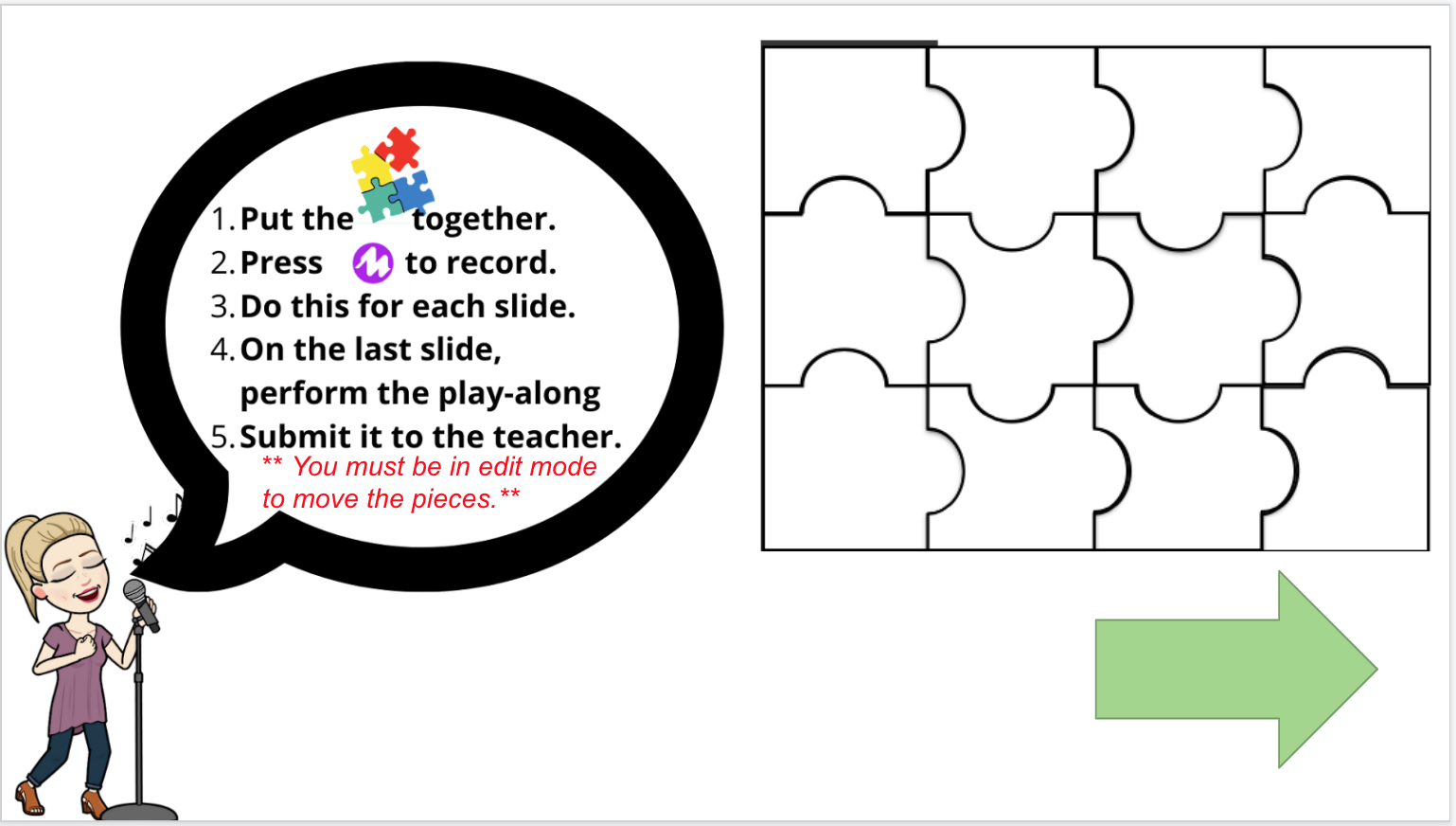
This google slides activity involves a puzzle for the students to solve. Once they solve the puzzle, they are to use the Mote Extension (https://chrome.google.com/webstore/detail/mote-voice-notes-feedback/ajphlblkfpppdpkgokiejbjfohfohhmk?hl=en-US) to record themselves performing the rhythm pattern. Once they have completed eight slides, they can press play and perform with the Be Thankful Rhythm Play-Along. Although this video was from Thanksgiving, it can be used throughout the year.

Seesaw: Being Thankful Rhythm Play-Along Retrieval Practice or Assessment

Very similar to the google slides activity, this Seesaw Activity uses the microphone tool to record themselves performing the rhythm pattern that they create from piecing the puzzle together. Once finished, they can press play on the ninth slide to perform all of the rhythm patterns with the rhythm play-along video.

Resources

Google Slides: https://docs.google.com/presentation/u/1/d/1XWZYsa-Mu7-Qcb7rT3u8h7dWxxDrOzJ0R19dU-nQsPg/copy

Seesaw: https://app.seesaw.me/pages/shared_activity?share_token=-163i544RUCMX3aV1K7nAg&prompt_id=prompt.a6088603-e514-4177-9e60-d06a771c261e

Check back as we count down to 2022 with #2 tomorrow!


Note: At the 5 min mark I say that google slides is much easier. However, Seesaw is what was supposed to be referenced at that 5 min mark.

Countdown to 2022: 5 Free Tech Activities for #Elmused (#4)

Here in the Northeast of the States, the holiday started with an outbreak of the Omicron variant of Covid. This caused schools to pivot their current plans and weigh the options of remote learning, concurrent learning, or live learning with more restrictions. This week, to bring us into 2022, I am going to blog and share daily activities that can be used in your adapted #elmused classroom when returning from the holiday break.

#4: Chrome Music Lab Song Maker Activities

Having your elementary students create music with Chrome Music Lab’s Song Maker is a wonderful activity within itself. However, this google site I created levels up the activity all in one place.

#Elmused Song Maker Activities

This google site, https://sites.google.com/view/songmakeractivitiesforelmused/home, has four Song Maker Activities for older elementary students. However, they can be adapted for younger elementary students, as well as work in a 1:1 environment, concurrent, remote, or asynchronous teaching atmospheres.

https://sites.google.com/view/songmakeractivitiesforelmused/home

I Have a Little Snowman

With this activity, your students will learn the song, see it played on Song Maker, see a video of it being played with Song Maker and playxylo.com, and then create a percussion line to the song. This activity gives the students opportunities to create and perform music using virtual instruments.

https://sites.google.com/view/songmakeractivitiesforelmused/home

Doggie Doggie

In this activity, the students can look over the melody and perform two Song Maker projects. The first one is to complete the melody because it has missing notes. The second one is to add a drum line to the melody. Though students can copy the melody to be successful, I would encourage those students who are working on ear training to figure out the melody in the first project.

I also added the playxylo link so that the students can perform it with the F# that is in the melody.

https://sites.google.com/view/songmakeractivitiesforelmused/home

Teddy Bear

This project is similar to Doggie Doggie. I also added the playxylo link to this activity as well so that the students can perform it with the F# that is in the melody.

https://sites.google.com/view/songmakeractivitiesforelmused/teddy-bear

Dvorak’s Largo Melody from Symphony No 9, Second Movement

This activity focuses on the tempo. The students listen to the Song Maker file that contains the introduction and adapted melody. From there, they create their own simple melody with a tempo of largo and chords to accompany it. This is for older elementary and would be a part of the practice portion of prepare/present/practice approach where the students would be working on practicing how to create a simple melody with a guided tempo and chords.

https://sites.google.com/view/songmakeractivitiesforelmused/home

Check back as we count down to 2022 with #3 tomorrow!

Trepak from Tchaikovsky's The Nutcracker: Rhythm Play-Along

In this play-along video, the students will practice half notes, half rests, quarter notes, and eighth notes in duple meter. This is a great tool for the practice portion of Kodály's prepare/present/practice approach. Here is a link to the process of creating this video using free tools: https://youtu.be/IrEfOhZK-1w

Holiday Rhythm Play-Along Mashup

Here is a rhythm play-along that includes 4/4 meter, whole, half, eighth, dotted quarter, and quarter notes, as well as fermata, repeats, rolls, and quarter rest. It is a mashup of six holiday songs listed below. Check back for a body percussion play-along to accompany this mashup, and eventually teaching materials. Like my resources? Please consider buying me a coffee at https://www.buymeacoffee.com/elmusedtech.

Music:

  • "All I Want for Christmas is You" written by Mariah Carey and Walter Afanasieff; Performed by Mariah Carey from Merry Christmas (1994) Columbia Records

  • "Rockin' Around the Christmas Tree" written by Johnny Marks; Performed by LeAnn Rimes from What a Wonderful World (2004) Asylum-CuRB Records

  • "Puppy for Hanukkah" written by Daveed Diggs with William Huston and Jonathan Snipes; Performed by Daveed Diggs (2020) published by Wonderland Music Company “I Have a Little Dreidel,” written by Samuel Goldfarb; Performed by Maccabeats (2018)

  • “Happy Kwanzaa,” Performed by FANOKO SINGERS (2015) CD Baby (on behalf of Fanoko Singers); ASCAP, CD Baby Pro (Publishing), and 2 Music Rights Societies

  • "Have Yourself a Merry Little Christmas" written by Hugh Martin and Ralph Blaine; Performed by Shawn Colvin from Acoustic Christmas (1990)

  • "Blue Christmas" written by Billy Hayes and Jay W. Johnson; Performed by Elvis Presley from Elvis's Christmas Album (1964) RCA Victor

5 #ElMusedTech Tools I am Thankful for in the Elementary Music Classroom!

After our teaching environments and the performing arts were upended by the pandemic, I reflect on five #ElMusedTech tools that I am thankful for in my elementary music classroom.

  1. Canva

    • Canva is your one-stop shop for creating manipulatives, slideshows, posters, video frames, and more. It allows you to create all from the app as opposed to searching throughout the internet to find the certain elements you will need. Educators can access a free version with their school email address.

  2. Chrome Music Lab

    • Chrome Music Lab has been one the favorite tools for music educators as it gives their students the opportunities to explore, create, perform music, as well as connect music with other subjects.

    • Here are some ideas to use in your classroom.

    • Here is an example of a project my first graders performed in art and music classes using the Kandinsky app,

  3. Play-Along Videos

    • Play-Along Videos became a necessity in our classrooms when we had to teach remote, concurrent, or in-person with numerous restrictions. However, Play-Along Videos can be beneficial for days when we have a sub, or as retrieval practice for concepts we have been teaching, or as an assessment tool, or as an activity before a holiday break.

    • Here are some favorites in Play-Along Videos.

  4. Playxylo.com

    • playxylo.com has been a fabulous tool so that any student with a device can perform with an instrument. Even before the restrictions on in-person teaching where we could not share instruments, virtual instruments gave students who could not play instruments traditionally, a way to perform and create music.

    • Here is my Virtual Instrument Closet that contains numerous instruments from websites to coded ones in scratch.

  5. Music Education Communities

    • Music Education Communities should be a source of comfort, advice, and support for music educators. Some that are wonderful because they support and help each other are Midnight Music Community, Music Ed with Missy, Music Teachers, Elementary Music Educators Idea Bank, Music Educators Creating Online Learning, E-Learning in Music Education, and more.

What are your favorite tech tools you are thankful for?

Mind Brain Education: CTTL Elementary Academy Day 1

For the past few years, we have explored and studied Mind Brain Education (MBE) through reading Neuroteach, written by Glenn Whitman and Dr. Ian Kellener, through various webinars and conferences, took online Neuroteach Global (NTG) courses, and participated in a four-day deep dive provided by The Center for Transformative Teaching and Learning (CTTL). The latter is one that I have not had the opportunity to take. Many of my colleagues, who have taken all of the above, had advised me that once I took the four-day intensive training, all of the other pieces of the training would fall into place. I hesitated on participating in the four-day course for two reasons: 1) It is a four-day course in the summer that makes it challenging for a working mother of school-aged children to attend. And 2) I felt that a focus on elementary MBE would be more applicable. When I learned that this summer the CTTL would provide online elementary-focused training, I jumped at the opportunity to attend.

Some Takeaways from Day 1 of MBE

After the morning session focused on the learning environment and student well-being, I began to immediately see how the four-day deep-dive in MBE would fill in the gaps of my studies. Some quick takeaways from day one as an elementary music educator:

  • Cognition and emotion are Interdependent.

  • When children feel safe, they learn better. I think about this alot, especially if music was the subject that made a child feel safe, gave them a sense of belonging, and their school took out the arts due to the pandemic. I am proud to say that most schools where I am located understood the importance of the arts and kept them offered and running all this past school year.

  • Pleasant emotions are where we strive our learning environment to be, versus unpleasant emotions (like students feeling judged, they notice others progressing and they feel that they are not, the nonverbal body cues from teacher, etc). In music class, how do we correct a student who makes a mistake and plays a song incorrectly? Do we tell them how to correct it or do we give them opporunities for them to own the song and correct it themselves?

  • Promising Principle 1: Understand the link between emotion and cognition – dedicate time to activities that are shown to increase well-being, such as read alouds, singing, journaling, art, and movement.

    • I love that singing is included in this!

  • When students who don’t feel like they belong are questioning if they are safe, then their active, working memories and their executive functioning skills are attacked first.

From The Center for Transformative Teaching & Learning ©2020 https://www.thecttl.org/

  • One of the best quotes to hear from your student is, “My teacher gets me”, not “my teacher likes me”. Though the latter is a nice feeling, the former means that the student understands why your music classroom is a place where they feel safe and will thrive.

Memory is the residue of thought – Prof. Dan Willingham

  • Lessons – who is doing most of the thinking? Me or the students? Am I taking away of their memory being fully functional if I am doing most of the thinking?

  • Learning happens when you think hard. So where in your lesson will your students think hard? And how do you get thinking hard at the top of your agenda? In music class, I attribute this to my youngest of students when I remember that when they are learning, I am not to sing with them. They need to have that independence as they learn to sing. When they have mastered a simple song, then I can sing with them.

  • What does the research point for the cultivation of habits for lifelong learning?

    • Value – is it worth the student’s time to learn?

    • Expectancy – Can they do it?

    • Costs – What are their barriers when learning and how can they overcome them?

The latter is why we learn how students learn. No matter what subject you teach, having and understanding this knowledge will help your classroom be a learning environment for student well-being as well as helping students develop habits for achievement and lifelong learning.

Want to learn more?

I will continue blogging my thoughts on this deep-dive. However, the best place to begin is to check out https://www.thecttl.org/ and to read Neuroteach. Finally, if you can ever catch a session presented by Dr. Missy Strong about music and neuroplasticity, I would highly recommend attending it. I have attended a few of her sessions on this topic in the past, and it helps me to understand how students learn music from the youngest of ages.
Mind Brain Education CTTL Elementary Academy Day 2

The Center for Transformative Teaching and Learning (CTTL) continued its elementary academy for the second day, with us further diving into Mind Brain Education (MBE).

Mind Brain Education (MBE) Mythbusters

We started the day by deciding whether statements about the brain and how children learn were true or false. This was done in small breakout rooms and it was a lot of fun. Trying to discuss and determine each statement was challenging and surprising. The CTTL has a deck of 52 cards with statements (Photo source: https://schoolstore.saes.org/shop-cttl/face-the-mbe-facts-a-neuro-mythbuster-activity-card-set). Out of the 12 that we worked on, we had two where we determined were one way but were actually the other way. The two that surprised some of us were, “Adolescents are better at multitasking” (this is proven to be true) and “In the always-connected-to-technology world students are now growing up in, attention spans are getting shorter” (this is proven to be false). It is an interesting game to play with your colleagues as it leads to healthy debates and discussions about the statements.

Students tell us how they learn

One of the best parts of today was listening to a variety of students, ages 6-11, talk about how they learn best in their classrooms. Many of them, regardless of age, had concurred that these items were essential:

  • They liked it when the teacher made learning fun (this was perceived as games or projects).

  • Hands-on projects were a lot of fun (the two kindergarten twins liked art as well as math because they could make things with their hands).

  • They did not like it when other children were loud in class as it distracted them and then, distracted the entire class.

  • They liked breaks in their schedule.

  • They liked knowing their schedule.

  • They liked having time to get the work done.

What does this mean for elementary music educators?

If you are reading this as an elementary music educator, you are probably not surprised at all by this information. The elementary music classroom is a hands-on classroom, with a variety of learning styles used like movement, hands-on playing of instruments, singing, etc., it does have a routine and pacing, and it gives the students the opportunity to work as an individual, as well as an ensemble.

However, our biggest challenge this year was that what we knew the students needed (all listed above), is what we could not give them in the traditional sense due to the pandemic. Therefore, we adapted and I feel like we succeeded to the best of our abilities. The only way an elementary music educator could not succeed is if the school took the arts program out of the school due to the pandemic. If that happened, let’s hope that the arts are coming back because, as I heard from our students today, they crave a time where they can move, where they can work in a group, where they can have music in their day, where they can use their hands to produce something fun and cool, and music classes and the arts check all of those boxes.

Want to learn more about Mind Brain Education (MBE)?

I will continue blogging my thoughts on this deep-dive. However, the best place to begin is to check out https://www.thecttl.org/ and to read Neuroteach. Finally, if you can ever catch a session presented by Dr. Missy Strong about music and neuroplasticity, I would highly recommend attending it. I have attended a few of her sessions on this topic in the past, and it helps me to understand how students learn music from the youngest of ages.

©2026 amymburns.com

Any info, student examples, pictures, graphics, etc, may be used with permission. Please contact me personally before using any info, student examples, pictures, graphics, etc.